Skip to content

Notes that read while you write.

Type your notes the way you always have. Each paragraph is read when you pause: anything that may conflict with the law or with the client's own policy is flagged beside your words, with the passage it rests on. A meeting gets the same reading, from the transcript you already have.

In pilot. Running at a pilot firm today; not yet on every account.

How Notespace reads a noteA paragraph you type is read when you pause. It is checked against the law, using the official text, and against the client's own policy documents that you add. What it finds docks in a slim Suggestions panel on the right as one-line items: two flags, a date, an action and a question. Details open in the panel when you click one.You typeRead when you pause, againstDocked on the rightYour noteThe lawChecked against theofficial textThe client’s policyUp to five policydocuments you addSuggestions5No resident Canadian directorOne signer on an $80,000 leaseResignation takes effectSend the consent by FridayShareholders' agreement?
How Notespace reads a noteA paragraph you type is read when you pause. It is checked against the law, using the official text, and against the client's own policy documents that you add. What it finds docks in a slim Suggestions panel on the right as one-line items: two flags, a date, an action and a question. Details open in the panel when you click one.You typeYour noteRead when you pause, againstThe lawChecked againstthe official textClient policyUp to fivedocuments you addDocked on the rightSuggestions5No resident Canadian directorOne signer on an $80,000 leaseResignation takes effectSend the consent by FridayShareholders' agreement?
A flag cites a section only when its words were found in the official text or in the policy; otherwise it says no authority was found. Suggestions are prompts to review, not conclusions.

Notespace. Suggestions in a slim panel, out of your way.

Your writing keeps the centre of the page. Flags, actions, dates, questions and facts collect in a panel docked to the right as one-line items; the detail opens in the panel only when you click one, and the panel folds away when you want the room.
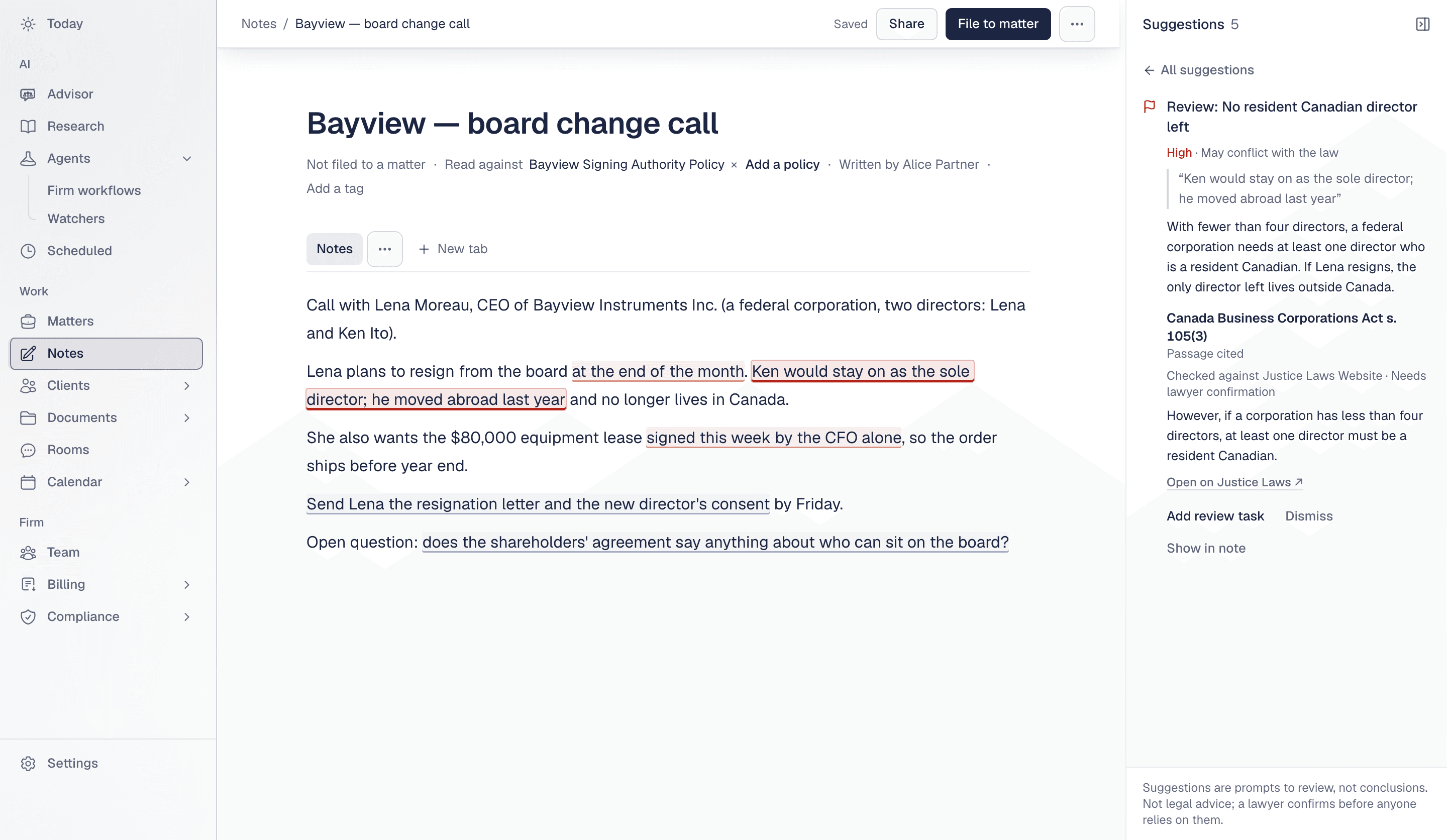
A note titled Bayview — board change call. Two passages are underlined as flags. The Suggestions panel on the right shows the flag No resident Canadian director left, marked High and May conflict with the law, with the quoted words, why, and the cited passage from the Canada Business Corporations Act s. 105(3), checked against the Justice Laws Website, and the line Needs lawyer confirmation
Synthetic example. The flag quotes the note, says why in plain words, and shows the official text it was checked against.
Flags

“May conflict with the law” or “May conflict with a policy”, with the words from your note, why, and the passage. Add a review task, or dismiss it.

Your client's policies

Add up to five of the client's own policy documents; the note is read against them as well as the law.

Actions and dates

Turn an action into a task on the matter, or a date into a proposed deadline. A date nobody stated reads “Needs date”.

Questions and facts

Open questions and the facts the note establishes, collected as you go.

File to a matter

Write first, and file the note to its matter when you are ready.

Meeting review. What needs a lawyer, then what was said.

Upload the transcript your video-call app exports, or paste it. Misolla reads it once, with its speakers and times. Under a one-line summary, the recap leads with what needs your review: each flag with who said it, when, the exact words and the authority. Then the action items, decisions, timestamped chapters, dates and open questions.
How meeting review reads a transcriptYou upload the transcript your video-call app exports, as .vtt, .srt, .txt or .docx, or paste it. Nothing is recorded live. Misolla reads it once and keeps the speakers and times. The recap reads, in order: a one-line summary with key facts; Needs your review, with each flag's words, why, and authority; action items; decisions; timestamped key discussion points; dates and deadlines; and open questions, which open Ask about this meeting. A timeline marks two flags at 1:20 and 1:58 and a decision at 2:38 in a meeting that runs 3:50.The transcript.vtt, .srt, .txt or .docx,or pasted textNothing is recorded liveRead onceSpeakers and timeskept; every claimtied to a lineThe recapSummaryOne line, then the key factsNeeds your reviewThe words, why, the authorityAction itemsTime · owner · actionDecisionsTime · who · decisionKey discussion pointsTimestamped chaptersDates and deadlinesEach one to confirmOpen questionsAsk about this meeting0:003:50Flag 1:20Flag 1:58Decision 2:38
How meeting review reads a transcriptYou upload the transcript your video-call app exports, as .vtt, .srt, .txt or .docx, or paste it. Nothing is recorded live. Misolla reads it once and keeps the speakers and times. The recap reads, in order: a one-line summary with key facts; Needs your review, with each flag's words, why, and authority; action items; decisions; timestamped key discussion points; dates and deadlines; and open questions, which open Ask about this meeting. A timeline marks two flags at 1:20 and 1:58 and a decision at 2:38 in a meeting that runs 3:50.The transcript.vtt, .srt, .txt or .docx, or pastedNothing is recorded liveRead onceSpeakers and times kept; everyclaim tied to a lineThe recapSummaryOne line, then the key factsNeeds your reviewThe words, why, the authorityAction itemsTime · owner · actionDecisionsTime · who · decisionKey discussion pointsTimestamped chaptersDates and deadlinesEach one to confirmOpen questionsAsk about this meeting0:003:501:201:582:38FlagDecision
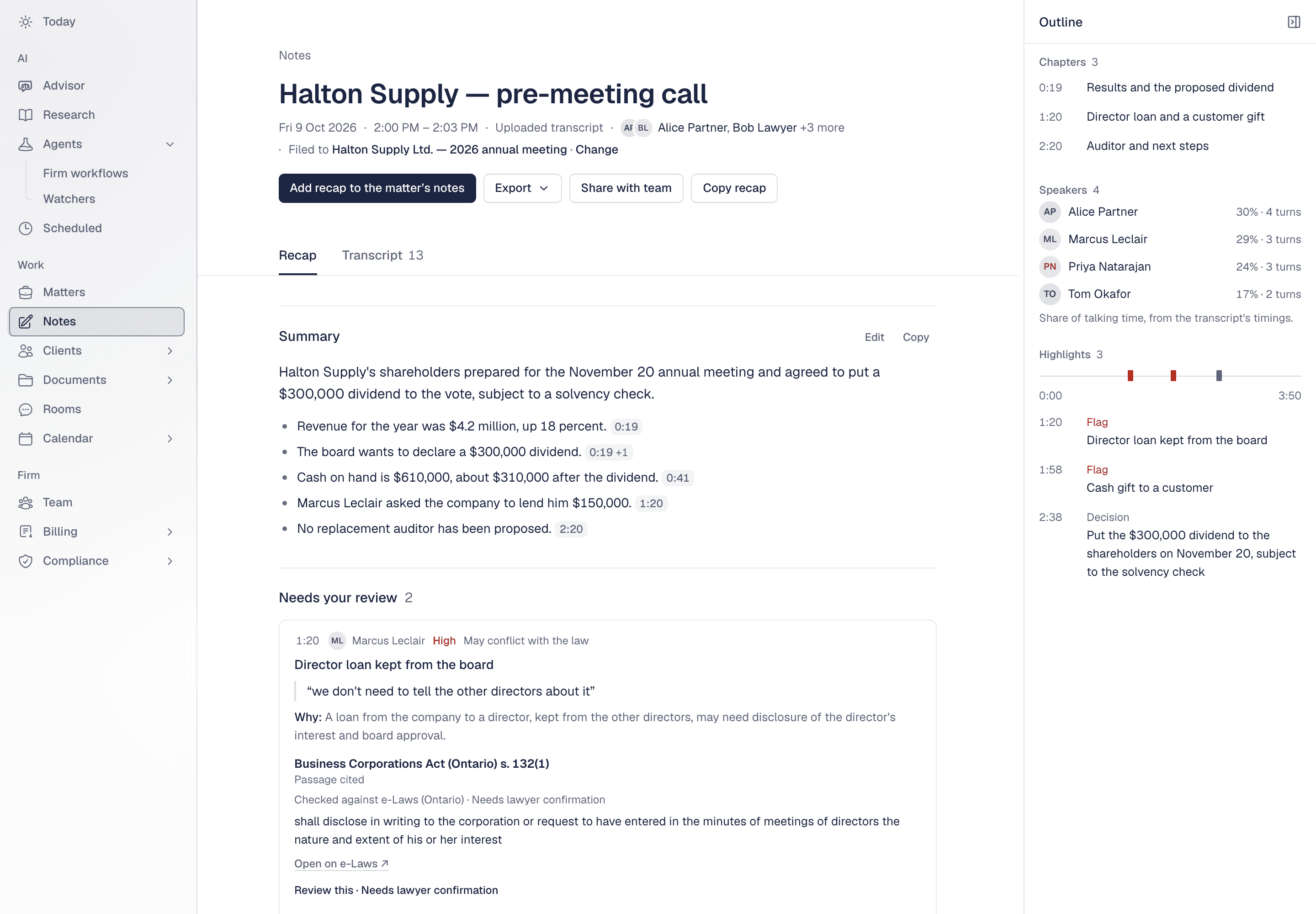
The outline beside the recap marks flags and decisions on the meeting's own timeline. Every timestamp opens the transcript at that line.
A meeting recap titled Halton Supply — pre-meeting call, from an uploaded transcript, filed to a matter. A summary with timestamped facts, then Needs your review with a flag at 1:20: Director loan kept from the board, quoting the speaker, with why and the cited passage from the Business Corporations Act (Ontario) s. 132(1), checked against e-Laws. On the right, an outline with chapters, speakers and highlights on a timeline
Synthetic example, from a test transcript of a fictional company. Every timestamp opens the transcript at that line.
Needs your review

Each flag has its timestamp, the speaker, the quoted words, why, and the authority. It reads “Review this · Needs lawyer confirmation”, never a conclusion.

Action items

Time, owner and action, with any due date stated. Add one as a task on the matter, assigned to its owner when they are in your firm.

Key discussion points

Timestamped chapters. Each sentence carries a mark that opens the transcript line it came from.

Ask about this meeting

An open question opens the advisor with this meeting and its matter attached.

Into the file

Add the recap to the matter's notes, or export it as a PDF on the firm's letterhead or as Word.

What it does not do. Meeting review does not join, record or listen to calls. It works from a transcript you upload (.vtt, .srt, .txt or .docx) or paste, and never handles audio or video.

Join the firms building on Misolla.See it on a matter like yours.

Private beta. Concierge onboarding. Migration from your existing tools. Co-designed workflows for your practice.

Book a call

Concierge onboarding · limited seats

Flags and suggestions are prompts to review, not conclusions. Nothing on this page or in the product is legal advice; a lawyer confirms before anyone relies on it. Examples use synthetic people and companies.